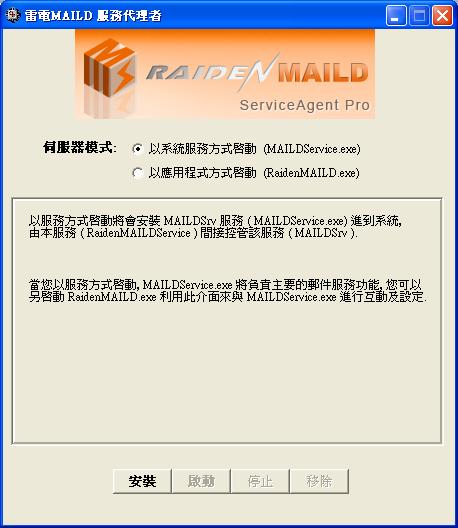
服務代理者為雷電MAILD 的代理服務程式, 負責得是啟動及監控雷電MAILD的工作. 假如您想在系統未登入時就將MAILD 啟動運作, 或利用服務來達到自我監控的功能, 就要利用此程式進行服務安裝.
(1) 以系統服務方式啟動 (MAILDService.exe)
在 2.1 版之後, 服務代理者提供兩種模式來啟動, 一種是新的系統服務方式, 另一種為舊有的應用程式啟動方式.
當您選擇系統服務模式, 您無須做任何設定, 只須按下安裝就能將 MAILDService.exe 安裝進系統服務, 此服務名稱為 MAILDSrv, 並且會一併安裝監控服務 RaidenMAILDService 到系統, 然後您按啟動就可以把郵件服務主程式 MAILDService.exe 給啟動起來.
安裝
安裝 RaidenMAILDService 和 MAILDSrv 服務進到系統
啟動
啟動服務, 設定正確的話將會一併將 RaidenMAILDService 和 MAILDSrv 服務啟動起來
停止
停止服務, 被服務啟動起來的 RaidenMAILDService 和 MAILDSrv 也一併被停止
移除
從系統移除 RaidenMAILDService 和 MAILDSrv 服務.
爾後, 若您要觀看即時記錄或進行設定只須另外執行 RaidenMAILD.exe , 它會進入 GUI 模式供您進行設定, 設定完畢您可以將 RaidenMAILD.exe 給關閉, 不會影響您的服務.

(2) 以應用程式方式啟動 (RaidenMAILD.exe)
這是 2.1 版之前的舊方法, 由於此方法有利有弊, 端看您用的系統來決定, 若是用 XP/2000/2003 的系統, 或許這方式反而是更直接的使用程式的方法, 老用戶應該都用得很習慣, 不過, 倘若您是用 VISTA/2008/Win7 等系統的用戶, 那就不建議用此方式了, 強烈建議升級到 2.1 版之後的版本來使用系統服務模式喔.
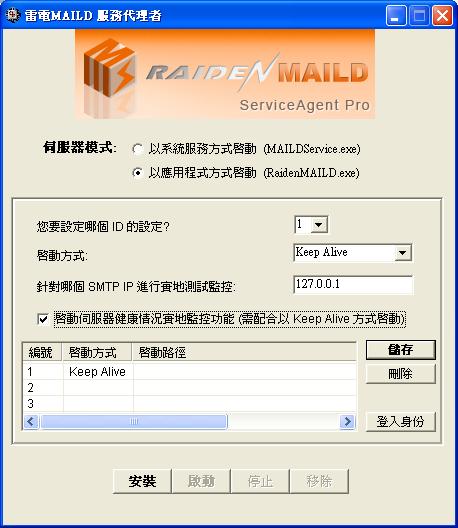
您要設定哪個 ID 的設定
MAILD 的服務代理者可提供三個雷電應用程式的設定, 每個 slot 可儲存一個 maild 啟動的設定, 也就是 3 個 slot 全都有設定的話, 最多可以利用此服務代理者一次啟動 3 個 maild.
啟動方式
啟動方式分為 Keep Alive 和 Start Once. Keep Alive 表示要保持被執行的 maild 要一直保持執行狀態, 就算 maild 被手動關閉或當掉, 也要再次將它啟動. Start Once 表示只在開機時啟動 maild, 之後就不用再管它了.
針對哪個 SMTP IP 進行實地測試監控
當您有啟用 Health Monitor, 您可以特地指定哪個 SMTP IP 就是 Health Monitor 所要去檢查的服務 IP
啟動伺服器健康情況實地監控功能(需配合以 Keep Alive 方式啟動)
啟動此功能後, Health Monitor 將每 10 分鐘對 MAILD 做實地的連線測試, 確認服務正常運作中, 否則將重新啟動 MAILD.
安裝
安裝 RaidenMAILDService 服務進到系統
啟動
啟動服務, 設定正確的話將會一併將 RaidenMAILD.exe 啟動起來
停止
關閉服務, 被服務啟動起來的 RaidenMAILD.exe 也一併被關閉
移除
從系統移除 RaidenMAILDService 服務.
建議: 進階閱讀知識庫相關文章- 有關如何正確/啟動雷電MAILD
← 回索引
雷電MAILD 官方網站: http://www.raidenmaild.com
村榮資訊 尊龍團隊 榮譽出品
Copyrights 2010, Team John Long. All rights reserved.
版權所有 翻印必究